Welcome to the ICOPA 2026 resources page for speakers, presenters and moderators designed to guide you in your preparation for the ICOPA 2026 Congress. Reference the section below specific to your presenter type/role within the congress and follow the outlined steps. Please visit the page regularly for updates on technical requirements, deadlines and general information. If you have any questions, please contact icopa_abstracts@kenes.com.
WHAT TO PREPARE?
INVITED SPEAKERS
- Register for the congress*
- Provide the required information in your ICOPA 2026 online profile** which includes:
- submitting a biography and a photograph (headshot) for the congress portal
- Prepare a PowerPoint presentation following the guidelines below
- Upload your final PowerPoint slide deck to the Speaker’s Ready Room (SRR) onsite***
- Present your talk onsite at your designated session time. To check your schedule, please visit the interactive program and type your name in the name search.****
*If you will be unable to present onsite in Montreal, please contact us urgently at vpetrova@kenes.com
**A link was emailed to you, if you did not receive it, please email us at icopa_abstracts@kenes.com
***Please note that uploading your slide deck to the SRR onsite at least one hour before the beginning of your session is mandatory even if you have previously sent it via email.
****Please note that while unlikely, session times may change. For the most updated details, please always check the interactive program and closer to the congress – the mobile application.
PROPOSAL SYMPOSIUM SPEAKERS
As a proposal symposium presenter you will need to:
- Register for the congress*
- Provide the required information in your ICOPA 2026 online profile** which includes:
- submitting a biography and a photograph (headshot) for the congress portal
- Prepare your talk and a PowerPoint presentation, which includes 25 minutes to present and 5 minutes for Q&A.
- Upload your final PowerPoint slide deck to the Speaker’s Ready Room (SRR) onsite***
- Present your talk onsite at your designated session time. To check your schedule, please visit the interactive program and type your name in the name search.****
*If you or another of your co-authors will not be able to attend the congress in Montreal, please contact us urgently at vpetrova@kenes.com
**A link will be emailed to you shortly. If you do not receive it by the end of April, please email us at: icopa_abstracts@kenes.com
***Please note that uploading your slide deck to the SRR onsite at least one hour before the beginning of your session is mandatory even if you have previously sent it via email.
****Please note that session times may change. For the most updated details, please always check the interactive program and closer to the congress – the mobile application.
ORAL ABSTRACT PRESENTERS
As an oral abstract presenter in a Parallel session you will need to:
- Register for the congress* by the announced registration deadline for abstract presenters.
- Provide the required information in your ICOPA 2026 online profile** which includes:
- submitting a biography and a photograph (headshot) for the congress portal
- Prepare your talk and a PowerPoint presentation, which includes 12 minutes to present and 3 minutes for Q&A.
- Upload your final PowerPoint slide deck to the Speaker’s Ready Room (SRR) onsite***
- Present your talk onsite at your designated session time. To check your schedule, please visit the interactive program and type your name in the name search.****
*If you or another of your co-authors will not be able to attend the congress in Montreal, please contact us urgently at vpetrova@kenes.com
**A link will be emailed to you shortly. If you do not receive it by the end of April, please email us at: icopa_abstracts@kenes.com
***Please note that uploading your slide deck to the SRR onsite at least one hour before the beginning of your session is mandatory even if you have previously sent it via email.
****Please note that session times may change. For the most updated details, please always check the interactive program and closer to the congress – the mobile application.
POSTER VIEWING PRESENTERS
As a poster viewing presenter you will need to:
- Register for the congress* by the announced registration deadline for abstract presenters.
- Prepare a printed poster and an E-Poster** following the guidelines below.
*If you or another of your co-authors will not be able to attend the congress in Montreal, please contact us urgently at vpetrova@kenes.com
*Please note: Abstracts accepted as regular posters for poster viewing are not assigned exact presentation times. Instead, presenting authors are kindly asked to put their printed poster on display and stand by their posters during coffee and lunch breaks to interact with other attendees interested in their work.
SESSION CHAIRS/MODERATORS
Will be published in due course.
POWERPOINT PRESENTATION GUIDELINES
IMPORTANT
Prepare a PowerPoint presentation if you are:
- Invited speaker in a keynote, plenary, symposium or proposal symposium session.
- Presenter of an abstract selected for oral or presentation in a Parallel session.
Please note:
- The first slide of your presentation must be your name and presentation title. You can download a template from the PPT Template tab below.
- We recommend that you label all slides that include unpublished data with a title: “UNPUBLISHED DATA – DO NOT COPY OR DISTRIBUTE”.
- The copying and recording of the presented content is prohibited. Presenters are encouraged to indicate in their presentations that the presented content shall not be shared or copied.
To aid in this, a digital graphic image may be incorporated into the poster. Click HERE to download.

Presentation Layout and Ration
- Format: Your presentation should be prepared in .PPT or .PPTX format.
- Ratio: Please note that the conference computers in the session Halls are supplied with Office 2019 (at least) and the native ratio of the projection on the screens in the Halls is 16:9. Click HERE for information on how to change the ratio to 16:9 in PowerPoint in order to avoid misplacement of text and pictures when presenting.
PPT Template
- DOWNLOAD the standard ICOPA 2026 PowerPoint slide deck template applicable to oral abstract presentations, proposal symposium presentations and invited speaker lectures (keynote, plenary, symposium session).
Presentation Slide Collection and Upload
- You can bring your slides to the Speaker’s Ready Room (SRR) on a USB stick.
- The SRR will be clearly signposted onsite and its location will be posted closer to the congress dates.
- Opening hours: will be posted closer to the congress dates
- You are asked to only use the congress computers in the session halls for presentation purposes. We may not be able to support lecture slides presented on personal computers.
- Please note that your slides must be finalized and ready on the day of your session.
- Please upload your presentation slides in the SRR as soon as you arrive at the venue in the morning and at least 1 hour before the start of the session.
- If you combine video clips with PowerPoint, please make sure to test it in the SRR during a coffee or lunch break prior to your session and at least 2 hours before the start of the session. In the SRR, a technician will assist you in checking whether the sound and picture from the video are transmitted well. Please make sure to repeat the test again during the break before your session in the session hall at the AV table to avoid technical issues.
Important for MAC USers
To use MAC presentations on a PC compatible computer, please note that you need to prepare your presentation according to the instructions below, before taking it to the Speakers’ Ready Room:
- Convert it to PowerPoint or PDF.
- Use a common font, such as Arial or Calibri (Special characters might be changed to a default font on a PowerPoint-based PC).
- Insert the images as JPG or JPEG. The following file types will NOT be visible on a PowerPoint based PC – TIF, PNG or PICT.
ONSITE PRINTED POSTER GUIDELINES
IMPORTANT
- Poster viewing presenters will receive designated poster board numbers closer to the congress dates.
- There will be no formal presentations at the printed poster gallery onsite. If your abstract is accepted for poster viewing, we recommend poster viewing presenters to stand close to their posters during breaks in order to interact with other attendees interested in their work.
- Poster boards will be located in the Exhibition and will be clearly signposted onsite.
- The copying and recording of the presented content is prohibited. Presenters are encouraged to indicate in their presentations that the presented content shall not be shared or copied. To aid in this, a digital graphic image may be incorporated into the poster. Click HERE to download.

Poster Layout and Orientation
- The dimensions of the poster board are LANDSCAPE.
- It is recommended that posters are prepared on one sheet of material.
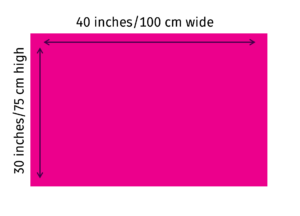
- It is recommended that your poster be no larger than 40 inches/100 cm wide x 30 inches/75 cm high (example print sizes: landscape-oriented quad crown, B1, A1, etc).
- Allocate the top of the poster for the title and authors as stated on the submitted abstract.
- The text, illustrations, etc. should be bold enough to be read from a distance of six feet (two meters).
- Tape/pins and other technical equipment will be available onsite for the mounting of posters. Please refer to the Poster Help Desk in the Poster Area onsite for any questions upon arrival.
- You can download a portrait poster sample with arrangement tips from HERE. Before printing, please double-check the dimensions with your print service provider to avoid low print quality.
- Please note that you are required to print and bring your own poster(s). The congress does not offer printing facilities onsite
Poster Mounting and Removal
*Printed posters should be mounted and removed following a schedule that will be published closer to the congress dates.
IMPORTANT:
- Your poster will be removed and discarded if you do not remove it by the time mentioned above.
- You are expected to prepare and bring your printed poster to the congress venue. There will be no printing facilities onsite.
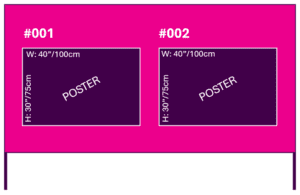
- Please note that each poster board will hold two posters as shown on the diagram below, so you are kindly required to mount your poster to the left or right side of the board based on your assigned number, leaving space for the other presenter to mount their poster.
- Please do not leave anything on the floor near or under the poster board once it is set up. Items on the floor (pins, cases, etc.) are a safety hazard, and the congress organizers are not responsible for any resulting losses.
- There will be a Poster Helpdesk onsite to provide assistance and tape/pins for mounting.
- Presenting authors are encouraged to stand by their posters during the breaks for informal discussions or to answer questions. There will be no formal presentations at the printed poster gallery onsite.
ONLINE E-POSTER GUIDELINES
IMPORTANT
Please note:
- Only E-Posters of registered presenting authors will be displayed in the E-Poster Gallery in the ICOPA 2026 mobile app and/or the congress website.
- Please note that onsite there will be traditional poster boards only.
- Poster presenters will be contacted via email with a dedicated link to upload their E-Posters by the end of April. Please contact us if you cannot locate your E-Poster upload instructions letter.
- Deadline for uploading your E-Poster: Wednesday, July 15, 2026.
Publication Consent:
- By uploading your E-Poster, you agree to have it published in the official ICOPA 2026 congress publications and/or the congress website and mobile application for on-demand viewing.
- The copying and recording of the presented content is prohibited. Presenters are encouraged to indicate in their presentations that the presented content shall not be shared or copied. To aid in this, a digital graphic image may be incorporated into the poster. Click HERE to download.

E-Poster Layout and Orientation
Please upload your E-Poster as a 1-page PDF file in LANDSCAPE orientation.
- Language: All E-Posters should be prepared in English
- File Format: PDF format – 1 page
- Orientation: Create your poster in a standard document software or a landscape-oriented PowerPoint and save it as a PDF file
- Font types: Arial or Calibri (optionally, Verdana, Times New Roman or Helvetica)
- Font size: 11 points or larger
- Hyperlinks, animated images, animations and videos are not permitted and will be non-functioning
- QR Codes are discouraged but if included, it is strictly forbidden to link to any promotional or marketing materials
- Images and tables: At least 200 dpi – good picture quality is essential
- When inserting images, photos, tables, etc., please use simple copy-paste and do not use embedded documents – the system does not support embedded files – audio or video.
- Avoid overlapping objects and layers – only the final view/status will be visible.
- When saving your PDF please do not use symbols or special characters (ie. +/@/ü) in the file name.
- Please do not use headers and footers.
- File size: Less than 5 MB
For an E-Poster template with arrangement tips, please click HERE.
By following the guidelines, you will ensure your E-Poster is displayed correctly and is ready for upload.
E-Poster Upload
- Poster presenters will be contacted via email by the end of April with a dedicated link to upload their E-Posters. Upload deadline: Wednesday, July 15, 2026.
- 24 hours after uploading, you can log back in and check how the E-Poster will appear on the online platform. If you wish to make changes, please use the “Edit Files” button. If you establish any technical issues, please contact us at icopa_abstracts@kenes.com.